


If you want search engine optimization that actually works, you’ve got to start with technical SEO.
Technical factors such as site speed, content layout, and internal linking help ensure your content is crawled, indexed, and ranked.
It’s the behind-the-scenes work that helps search engines find and understand your content.
Let’s tighten up your site and let Google do the rest.
TL;DR
- Technical SEO is the infrastructure that allows Google (and AI Search algorithms) to crawl, index, and understand your fintech website. Without it, even the best content won’t rank.
- An in-depth technical SEO audit uncovers issues like duplicate content, broken links, redirect chains, weak header structure, and indexing errors that silently block your visibility.
- Core technical elements such as metadata, page speed, schema markup, and smart internal linking directly influence rankings, click-through rates, and user experience.
- Fintech sites need especially strong technical foundations because users and search engines demand trust, clarity, accuracy, and fast, frictionless performance.
What Is Technical SEO?
Technical SEO is the infrastructure layer of your website. It’s the stuff under the hood that helps search engines crawl, index, and understand your pages.
If your site has great content but a poor technical setup, you’re bottlenecking your SEO potential.
Technical SEO includes:
- Fast site speed (especially on mobile)
- Secure connection (HTTPS)
- Mobile-friendly, responsive design
- Clean, crawlable site architecture
- XML sitemap and robots.txt file
- Structured data (Schema markup)
- Canonical tags to avoid duplicate content
- No broken links or redirect chains
- Proper indexing (check for noindex, canonical, and disallowed pages)
- Core Web Vitals performance
- Internal linking that supports crawl depth
- Minimal or well-managed JavaScript rendering issues
Technical SEO doesn’t boost rankings on its own. But without it, your rankings won’t stick.
Start with a Technical SEO Audit
Before you fix SEO issues or scale content, you need a technical SEO audit.
Otherwise, you’re optimizing blindly and wasting time, budget, and traffic potential without knowing what’s holding your site back.
You can run an audit in-house with tools like SEOptimer or Moz, or bring in a specialist.
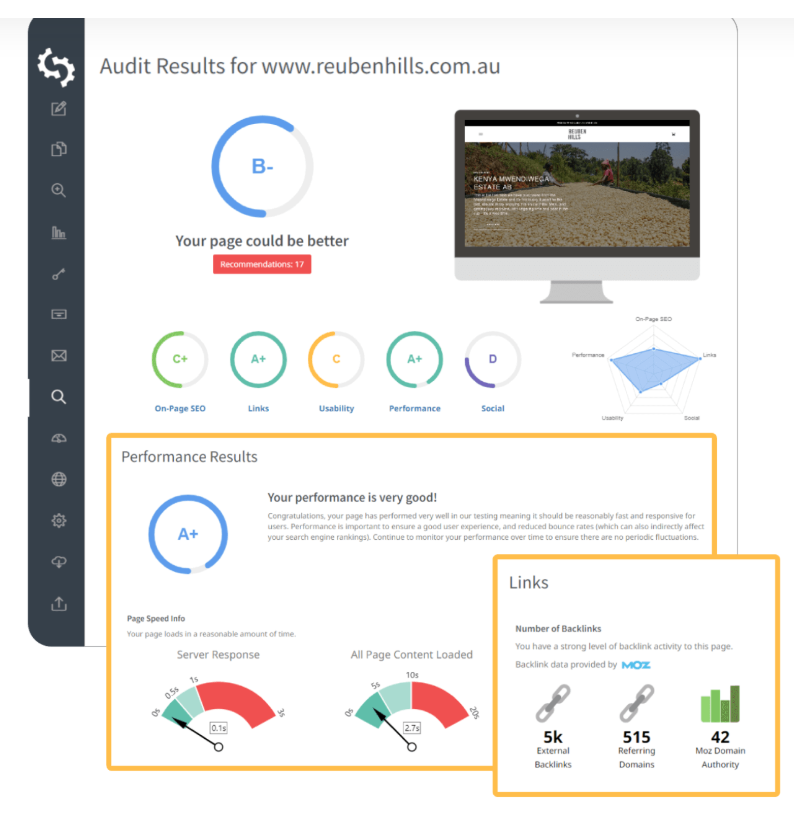
Source: SEOptimer
Check for Duplicate Content
Duplicate pages confuse search engines. They don’t know which version to rank, index, or pass link equity to. That uncertainty costs you visibility.
Identify duplicate URLs and use canonical tags where needed. Temporarily apply noindex or nofollow to low-priority duplicates.
You should also consider rewriting or consolidating weak content.
Audit Header Tag Structure
Headers (H1, H2, H3) guide crawlers through your content.
Ensure you have only one H1 per page that’s focused on the main keyword. Check that they follow a logical hierarchy (no skipping from H1 to H4) and that there’s relevance between headings and body content.
Scan for Broken Links and Redirect Issues
Every bad link or redirect chain chips away at your crawl budget and user experience.
Check that there are no 404 errors. Redirect chains and loops (consolidate them), and use 301s for permanent redirects, not 302s.
Run a crawl using Screaming Frog, Sitebulb, or Ahrefs Site Audit to catch these fast.
Review robots.txt
The robots.txt file controls what Google can and can’t crawl. One wrong line can block entire sections of your site.
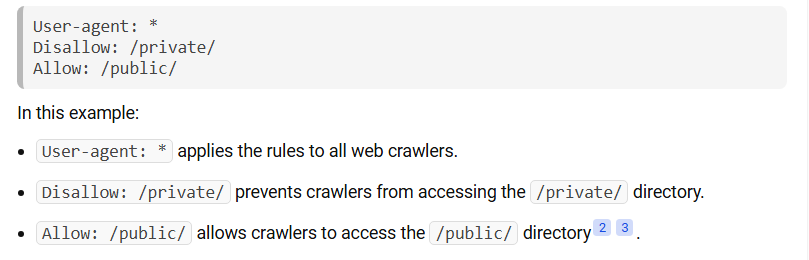
Source: Wikipedia.org
Look for:
- Accidental disallows (like blocking / or /wp-content/)
- Conflicts with your sitemap or meta tags
- Pages that should be noindex, not blocked altogether
Optimize Image Alt Text
Alt text helps screen readers and Google understand your images. Specificity matters.
Ensure you describe the image clearly and concisely, use relevant keywords naturally, and prioritize key pages (home, services, high-converting blog content).
Bonus tip: Optimized images also help you rank in Google Images.
4 Technical SEO Elements to Maximize Optimization
Once you’ve patched your errors from your technical SEO audit, it’s time to sharpen the core technical elements that directly impact rankings, visibility, and the user experience.
These are non-negotiables if you want to compete at the top of search results.
HTTPS/SSL
HTTPS is a confirmed Google ranking factor and a trust signal users actively look for.
If your site still runs on HTTP, your visitors will see a “Not Secure” warning in their browser. That’s an instant credibility killer.
SSL (Secure Sockets Layer) encrypts data between your server and users’ browsers, protecting sensitive information like passwords, payment details, and personal data.
To implement HTTPS:
- Purchase an SSL certificate from your hosting provider or use a free option like Let’s Encrypt
- Install and configure it on your server
- Update all internal links to HTTPS
- Set up 301 redirects from HTTP to HTTPS
- Update your sitemap and robots.txt
Fintech Tip: If you’re collecting user data or processing payments, SSL isn’t just recommended. It’s legally required under PSD2 and PCI-DSS standards. For sites collecting user data under GDPR, HTTPS is considered a best practice security measure.
Mobile-Friendliness
More than 60% of web traffic comes from mobile devices. If your site doesn’t work seamlessly on smartphones, you’re losing users and rankings.
Google uses mobile-first indexing, which means it crawls and ranks your site based on the mobile version, not desktop.
A clunky mobile experience directly impacts your visibility in search.
To optimize for mobile:
- Use responsive design that adapts to any screen size
- Keep tap targets large enough (minimum 48×48 pixels)
- Avoid intrusive pop-ups that block content on small screens
- Ensure text is readable without zooming (16px minimum)
- Test load speed on mobile networks (aim for under 3 seconds)
Fintech Tip: If your platform includes forms, dashboards, or calculators, make sure they’re thumb-friendly and don’t require excessive scrolling or pinch-zooming.
Site Architecture
Site architecture is how your pages are organized and linked together. Good architecture helps users find what they need and search engines understand what your site is about.
A logical structure improves crawlability, distributes link equity, and makes your content easier to discover.
Best practices for site architecture:
- Keep your structure shallow (3 clicks max from homepage to any page)
- Use clear, descriptive URLs that reflect your hierarchy
- Create topic clusters around core content pillars
- Implement breadcrumb navigation for context
- Build an XML sitemap and submit it to Google Search Console
Link equity flows from your homepage down through your site. The more clicks it takes to reach a page, the less authority it receives.
Fintech Tip: If you offer multiple products (loans, credit cards, investment tools), organize them into clear categories with dedicated landing pages. Don’t bury key conversion pages five clicks deep.
Page Load Speed
Google uses page speed, especially on mobile, as a ranking signal. More importantly, users bounce when your site drags. Pages that take 5 seconds to load have a bounce rate of nearly 40%.
If your site’s slow, your rankings will be too.
To improve speed:
- Compress images and lazy-load where possible
- Minimize third-party scripts
- Use image formats like WebP
- Enable browser caching and GZIP compression
- Invest in a fast, secure hosting provider
Fintech Tip: If your platform includes calculators, data tables, or dashboards, make sure they’re not bogging down your load times.
Core Web Vitals
Core Web Vitals are Google’s official performance metrics for measuring real-world user experience. They’re part of Google’s Page Experience signals and directly impact rankings.
The three Core Web Vitals measure different aspects of page performance:
- Largest Contentful Paint (LCP) measures loading speed, specifically, how long it takes for the largest visible element (image, video, or text block) to appear on screen. Good LCP is 2.5 seconds or less. Slow LCP frustrates users and kills conversions.
- Interaction to Next Paint (INP) replaced First Input Delay in 2024 and measures responsiveness (how quickly your page reacts when users click buttons, open menus, or fill forms). Good INP is under 200 milliseconds. If buttons lag or forms freeze, users bounce.
- Cumulative Layout Shift (CLS) measures visual stability (how much content jumps around while the page loads). Ever tried clicking a button, only to have an ad load and shift everything down? That’s bad CLS. Good CLS is under 0.1.
To improve your LCP, optimize your largest images (use WebP, lazy loading), upgrade hosting, enable CDN delivery, and reduce server response time.
For a better INP, minimize JavaScript execution, break up long tasks, use web workers for heavy processing, and optimize third-party scripts.
To achieve that CLS under 0.1, set explicit dimensions for images and videos, reserve space for ads, and avoid inserting content above existing content.
You can test your Core Web Vitals using Google PageSpeed Insights, Chrome DevTools, or Search Console’s Core Web Vitals report.
Fintech Tip: Data-heavy pages with charts, calculators, or real-time pricing can struggle with INP and CLS. Preload critical assets, render static content first, and load interactive elements progressively rather than all at once.
Internal Linking
Internal linking is how you control the distribution of link equity (also called “link juice” or PageRank) throughout your site. Every page has a certain amount of authority, and internal links pass portions of that authority to other pages.
Your homepage typically has the most authority because it receives the most external backlinks. From there, authority flows outward through internal links. Pages buried deep in your site with few internal links receive minimal authority and struggle to rank.
Strategic internal linking principles:
- Flatten your architecture: Every important page should be 2–3 clicks from the homepage.
- Prioritize high-value pages: Commercial pages (product, service, conversion) should receive more internal links than low-value pages (archives, tags).
- Anchor text optimization: Use varied, keyword-rich anchor text that describes the destination page.
- Context matters: In-content links pass more authority than navigational links (header, footer, sidebar).
- Orphan pages are invisible: Pages with zero internal links won’t get crawled or ranked. Every page needs at least one internal link.
Fintech Tip: Create a hub-and-spoke model for complex topics. A pillar page on “Cryptocurrency Investing” should link to spokes like “How to Buy Bitcoin” and “Crypto Tax Guide.” This structure builds topical authority.
JavaScript Rendering
JavaScript rendering refers to how content is generated and displayed on your site. If your site relies heavily on JavaScript to load content, search engines might struggle to see and index it properly.
There are three main rendering approaches:
- Client-Side Rendering (CSR): JavaScript runs in the user’s browser to build the page. The initial HTML is nearly empty, and everything loads dynamically. This is common with React, Vue, and Angular apps.
- Server-Side Rendering (SSR): The server generates fully-formed HTML before sending it to the browser. Content is immediately visible and crawlable. This is the traditional approach and still the most SEO-friendly.
- Static Site Generation (SSG): Pages are pre-built at build time and served as static HTML. Fast, crawlable, and ideal for content that doesn’t change frequently.
Start by using SSR or SSG whenever possible, especially for content-heavy pages where crawlability is critical.
Include your core content in the base HTML so it’s visible even if JavaScript fails to execute. Test with Google’s URL Inspection tool to catch rendering problems before they tank your rankings, and defer non-critical scripts to keep load times fast.
Fintech Tip: Use SSR for marketing pages and loan applications, but keep client-side rendering for live dashboards and trading interfaces where real-time updates matter more than SEO.
Metadata
Meta tags are your site’s behind-the-scenes details that tell search engines what each page is about.
Focus on:
- Title tags: These are the titles of each page and should be clear, relevant, and keyword-optimized. Keep it under 60 characters.
- Meta descriptions: Summarize the page, include the keyword, and make it click-worthy (max 155–160 characters).
- Meta robots tag: Use this to control indexing and crawling when needed.
These elements don’t appear on the page, but they heavily influence how your content shows up in search and whether users click.
Schema Markup (a.k.a. Rich Snippets)
Schema tells search engines how to interpret and display your content in search. It turns traditional listings into something like this this:

Structured data enhances your listings with review stars, product details, FAQs, event info, and breadcrumbs.
These rich results increase your click-through rate, even if your position stays the same.
Fintech Example: Use schema to markup software product reviews, pricing tiers, how-to content, or knowledge base articles.
Smart CTAs
Call-to-Actions (CTAs) serve as conversion signals and behavioral cues for users and search engines.
Every CTA should be clearly visible and relevant to the page’s intent. It should also drive users deeper into your funnel (not just “Sign Up” but also “See pricing,” “Book a demo,” “Download report”).
CTAs also impact time on site and engagement—both secondary signals Google uses to judge quality and relevance.
Pro Tip: Poorly linked or misleading CTAs kill trust and bounce rates. Audit them like you audit your code.
Prepping Your Site for Better SEO
Your website’s technical health is the foundation for SEO, but content gets you found. Without it, your visibility, rankings, and conversions won’t move, no matter how fast your site loads.
Here’s how to make your content work as hard as your infrastructure.
Choose Keywords That Matter
Keywords are what connect your content to real search behavior. Instead of focusing just on volume, choose keywords that align with user intent.
Search engines measure how people interact with your pages. If they bounce, you likely targeted the wrong keyword or wrong intent, and that kills your rankings.
Here’s how to get it right:
- Understand your audience. What are their pain points? What questions are they asking? Use tools like Google Search Console, Ahrefs, Answer the Public, or forums like Reddit to find their language.
- Look for intent, not just traffic. A keyword like “invoicing tools for freelancers” is more useful than “freelance work”. The first one shows buying intent, while the second one is vague.
- Get the data behind the search. Semrush, Ahrefs, and Google Keyword Planner are your go-to stack. Filter by difficulty, CPC, CTR, and trend lines, not just search volume.
- Spy on competitors. See what’s ranking for your niche, reverse-engineer the content, and find gaps they missed.
Ranking for the wrong keyword will inflate your traffic and kill your conversions.
Create User-Centered Content
Your blog or landing pages aren’t there to fill space. It should attract leads, build authority, and guide users down a funnel.
To do that, your content needs to solve real problems, offer clear takeaways, and align with your product or service.
Content strategy means planning the right topics for the right people, distributed in the right places.
For example, Piktochart increased signups by 860% and outranked Canva for “presentation maker.”
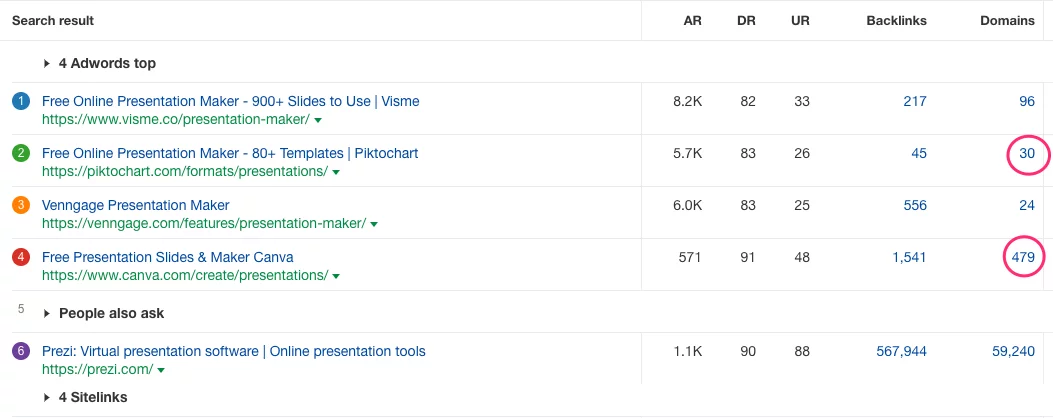
They achieved this not by keyword stuffing, but by pairing high-authority backlinks with content users actually needed. That’s strategy.
Build Quality Backlinks
Google still treats links as trust signals. But now it cares about:
- Relevance: Is the referring domain in your industry?
- Authority: Does it have domain strength?
- Context: Is the link editorial and natural?
When done right, link building is earned, not forced.
You can get high-quality links that Google cares about by pitching content to industry blogs, publishing original research or data, and getting mentioned in roundups, interviews, and expert takes.
Avoid random forum backlinks, paid link schemes, or marketplaces. Google sees right through it and penalizes hard.
How Is Technical SEO Different for Fintech?
For most industries, SEO is about scale. Drive as much traffic as possible, convert what you can, and move fast.
But in fintech, SEO trades volume for trust, relevance, and precision.
Whether you’re offering business lending, personal finance tools, or payment infrastructure, your audience needs proof you know what you’re doing.
That’s why fintech SEO leans heavily on content depth, technical clarity, and airtight site performance.
Trust Our Experts With Technical SEO for Fintechs
Fintech SEO is technical by default. Cleaning up your technical structure shows you’re in it to provide a service, not just collect clicks.
Our technical SEO experts endlessly test, optimize, and experiment with content for Fintech companies and audiences worldwide.
